
FOX 8 WVUE Mobile
Gray MediaNews & Magazines
3.6277.00 Reviews
- Version
- Varies With Device
- Installs
- 100.00K
- Age Rating
- Everyone
Screenshots

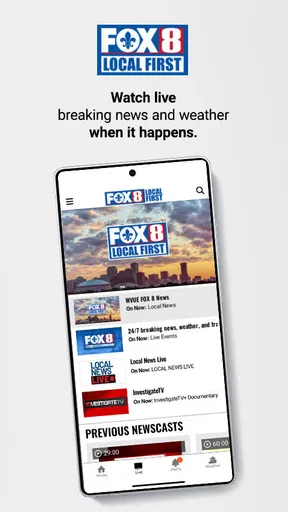

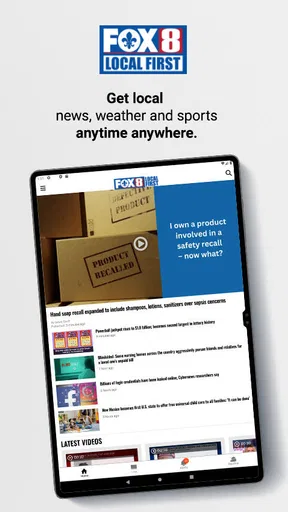
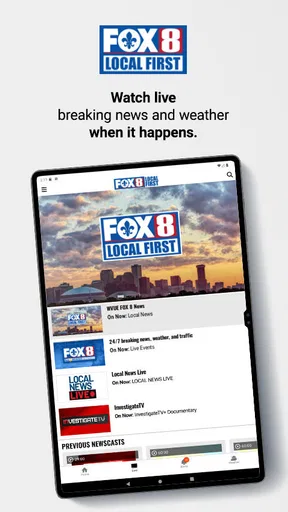

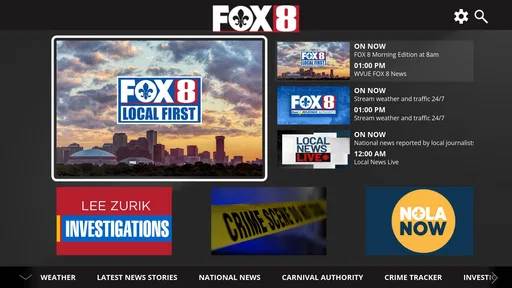
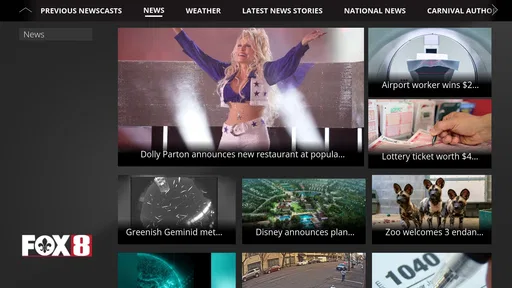
Our Review of FOX 8 WVUE Mobile
 Analysis by Appyee
I found FOX 8 WVUE Mobile most useful when I treated it as a quick local-news check rather than as my only source for everything happening in the world. Developed by Gray Media, this free News & Magazines app brings together local reporting, sports coverage, and video for people who want a convenient way to keep up from a phone. It is aimed at everyone, and its straightforward focus makes sense for viewers who already know the FOX 8 WVUE brand and want that coverage close at hand.
My overall impression is mixed but practical. The app can fit neatly into a morning routine, a commute, or a short break when I want a quick look at current stories. At the same time, the average score of 3.6 from around 1.1 thousand ratings suggests that the experience is useful without being universally polished. I would recommend trying it if local relevance matters more to you than having one perfectly unified national-news dashboard.
How I use FOX 8 WVUE Mobile day to day
I use FOX 8 WVUE Mobile as a purposeful check-in rather than something to leave open all day. That makes it easier to notice whether a story is worth my attention without turning a quick visit into endless scrolling. I also keep a simple distinction in mind: the app helps me follow the station’s coverage, while the next section looks at what to try when opening or using it does not go smoothly.
A simple local-news routine works best
My baseline workflow starts with opening the app when I have a specific reason to check the news. I might look for a developing local story, scan the sports coverage, or watch a video report instead of reading a longer article. That narrow purpose is where the app feels most natural. It is less about replacing every news source and more about giving FOX 8 WVUE content a dedicated place on my phone.
A realistic everyday example is a weekday morning. I can open the app while having coffee, skim the most relevant headlines, and move on without building a complicated reading queue. Later, if a local story changes during the day, I can return to the same app for another look. This habit is more efficient than repeatedly searching the web for the station or relying on social feeds where a local report may be mixed with unrelated posts.
The combination of articles and video is particularly useful when I do not want to read every detail. A written report is better when I need to revisit facts or quietly scan a story. Video is more convenient when I want the tone and presentation of a broadcast-style update. I would not assume that every story is equally strong in both formats, so I choose based on how much attention I have available.
The app works best as a local information checkpoint, not as a complete replacement for broader news reading. For national coverage, specialist reporting, deep analysis, or a wide range of viewpoints, I would still use additional sources. FOX 8 WVUE Mobile has a clearer identity when I use it for the local perspective it is designed to deliver.
What the main sections are good for
The news area is the part I would visit most often. It gives the app a practical purpose beyond simply watching clips. I can use it for a quick headline scan, then open the stories that deserve more attention. That two-step approach helps prevent a common mistake with news apps: spending time opening everything instead of deciding first what actually matters.
Sports coverage gives the app another useful entry point. Someone who follows local teams or wants sports updates alongside local reporting may appreciate having both in one place. I would still compare important scores or major developments with a dedicated sports service when accuracy and breadth are especially important, but the built-in coverage is convenient for routine checking.
Video changes the pace of the experience. It is a good option when I am at home or have headphones available, but it is not always the best choice in a quiet public place. I tend to use written stories when I need speed and video when I have enough time to watch. That small distinction makes the app feel more manageable than treating every item as something to consume immediately.
Settings and habits worth checking
Before settling into regular use, I would inspect the app’s available settings and notification controls rather than accepting every default automatically. News alerts can be useful for genuinely urgent local developments, but they can also interrupt the day if they arrive too often or cover topics I do not care about. I prefer enabling only the alerts that support a clear purpose, then turning them off if they become background noise.
This is also a good place to decide how the app fits into your attention. If I use it mainly for morning reading, I do not need to respond to every alert as it appears. If I rely on it for fast local updates, notifications may be more valuable. The right choice depends on whether I want a scheduled check-in or an always-available stream of prompts.
I would also review how video fits into my mobile routine. A video-heavy session may be less comfortable on a limited connection or when battery life is important, so I avoid opening clips automatically when I am trying to conserve resources. The app’s value does not depend on watching every video. I can treat video as an optional layer and keep written articles as the faster default.
Another useful habit is to keep the app’s role clear. I do not use it as a personal archive of every event or as a research database. If I need to remember a detail, I save the relevant information in my own notes or return to the story later rather than assuming a news feed is designed for long-term organization. That approach reduces frustration and keeps expectations realistic.
Faster patterns for repeat users
Experienced use is less about discovering a secret feature and more about repeating a sensible sequence. I open the app, scan before selecting, choose either text or video depending on the situation, and leave once I have the information I came for. This sounds basic, but it prevents the app from turning a two-minute check into an unplanned browsing session.
When I am short on time, I start with the most relevant local stories and skip anything that does not affect my immediate interests. On a slower evening, I use the same starting point but allow myself to move into sports or video. Keeping those two modes separate gives me control: a fast mode for practical updates and a relaxed mode for fuller browsing.
I also find it helpful to use the app at consistent points in the day instead of opening it whenever I feel bored. A morning check can cover overnight developments, while an afternoon or evening check can catch changes that matter later. This repeatable rhythm is more useful than constantly refreshing because it gives the information a place in my routine.
For families, the Everyone age rating makes the app broadly approachable, but I would still guide younger users toward discussing major stories rather than consuming news without context. The age classification makes the app accessible; it does not turn every report into something suitable for every emotional situation. That is a general media judgment I would apply to local news, sports injuries, emergencies, and other serious subjects.
Where it compares well with usual alternatives
Compared with opening a mobile browser and searching for FOX 8 WVUE each time, a dedicated app is more direct. I do not have to remember the exact search wording, sort through unrelated results, or move between several pages before reaching the station’s coverage. That convenience is the strongest reason to install it instead of using a browser shortcut.
Compared with a broad news aggregator, the app offers a more focused local identity. Aggregators are better when I want many publishers, international headlines, or topic-based discovery. FOX 8 WVUE Mobile is better when I already want this particular outlet’s local news, sports, and video in one place.
Compared with social media, the app gives me a less distracting starting point. Social platforms can surface breaking reports quickly, but they also surround them with comments, reposts, speculation, and unrelated material. I prefer checking the app when I want a cleaner path to the station’s own coverage. Social media can still be useful for discovering that something is happening, but I would rather verify the story through a direct news source.
Compared with a national news app, this one is naturally narrower. A national service may offer stronger personalization, more extensive background reporting, and a larger range of subjects. I would choose FOX 8 WVUE Mobile when local relevance is the priority, not when I want a single app to explain every major event.
Limitations that affect the experience
The rating of 3.6 indicates that the app has room to improve, and my expectations would reflect that. A focused local-news app can be valuable even when its navigation or presentation is not as refined as the biggest national platforms. I would judge it by whether it gets me to useful FOX 8 WVUE coverage efficiently, rather than expecting the same depth of customization found in larger services.
Its narrow editorial focus can also feel limiting. If I want business, technology, international affairs, or long-form analysis, I will probably need another app. The same is true if I expect a highly personalized feed that learns every preference. The advantage of a local station app is focus, but focus always means giving up some breadth.
Video may introduce its own friction depending on where and how I use the app. Watching is less discreet than reading, and a clip is not always the quickest way to find one specific detail. I would not install this app solely for video unless I already value FOX 8 WVUE’s presentation style. For me, video is a useful complement rather than the entire reason to keep the app.
I also would not rely on one news app for urgent decisions without checking the latest available information from appropriate official sources. Local coverage can help me understand an event, but emergency instructions, travel changes, school notices, or public safety information may require direct confirmation. That is not a criticism unique to this app; it is an important boundary for mobile news in general.
Who should install it
I think FOX 8 WVUE Mobile is a sensible choice for people who already follow FOX 8 WVUE and want a convenient mobile route to its local reporting. It also suits readers who like combining short written updates with station-produced video, and sports followers who prefer having that coverage beside local news instead of switching between unrelated services.
The free price removes the main financial barrier, which makes testing it easy. With over 100 thousand installs, it has reached a meaningful audience, while its release in the middle of the last decade shows that it has been available as a mobile news option for years. I would still make the decision based on current usefulness rather than age: install it, use it through a normal news cycle, and see whether the local focus fits your routine.
I would skip it if I want one polished app for international headlines, detailed investigations, personalized topic feeds, and extensive archives. I would also skip it if I rarely follow local news or never watch station video. In those cases, a broad aggregator, a national publication app, or a browser-based setup may serve me better.
My verdict after building a repeatable workflow
After using it as a focused local-news tool, I see FOX 8 WVUE Mobile as a practical companion rather than a universal news solution. Its strengths are clear: direct access to FOX 8 WVUE coverage, a mix of news, sports, and video, and a free entry point that works for a wide audience. Its weaknesses are equally clear: a limited scope, potential notification fatigue, and an experience that may not satisfy people seeking advanced personalization or broad national coverage.
My recommendation is conditional but positive. If you live in the area covered by FOX 8 WVUE, already trust the station’s local perspective, and want a repeatable way to check headlines without searching the web, I would give it a try. Set the alerts around your real needs, use text for quick checks, reserve video for moments when you can pay attention, and keep another source available for broader or official information.
That workflow lets the app do what it does best without asking it to become something else. For me, that makes it a worthwhile free download for local-news followers, while readers looking for a complete all-purpose news platform should choose a broader alternative alongside it.
Verdict
Strengths of FOX 8 WVUE Mobile
- Fast access to breaking news across New Orleans and southeast Louisiana.
- Useful weather forecasts, radar maps, and severe-weather alerts.
- Live video coverage helps users follow major local events.
- Customizable notifications keep important regional updates visible.
- Simple layout makes headlines and sections easy to browse.
Limitations of FOX 8 WVUE Mobile
- Some alerts may feel frequent, especially during extended weather coverage.
- Video playback can use significant mobile data when streaming on cellular networks.
- Coverage is mainly local, offering limited value outside the WVUE viewing area.
- Advertising can interrupt browsing and reduce the available screen space.
- Some stories may require waiting for videos or images to load on slower connections.
Other Releases by Gray Media
View All
KY3 Weather
Weather4.6

Telemundo Atlanta
News & Magazines4.3

FOX5 Vegas - Las Vegas News
News & Magazines2.9

WAFF 48 First Alert Weather
Weather4.6
Similar Picks in This Category
View All
Google News - Daily Headlines
Google LLC4.0

X
X Corp.4.8

Flipboard:Your Social Magazine
Flipboard3.4

Opera News: breaking & local
Opera4.5

Hindi News by Dainik Bhaskar
Dainik Bhaskar Group4.0

Way2News Daily News App
Way2News ( Formerly Way2SMS )4.6
Frequently Asked Questions
What is FOX 8 WVUE Mobile?
FOX 8 WVUE Mobile is the official news application for WVUE FOX 8 in New Orleans and the surrounding Louisiana region. It provides access to local and regional news, weather forecasts, live radar, traffic updates, sports coverage, videos, and important breaking-news alerts. The app is designed for users who want quick access to station content while away from a television or computer.
What kind of news and content can I find in the app?
The app typically includes local news stories, breaking-news reports, weather information, severe-weather coverage, sports updates, traffic reports, investigative pieces, and video clips from FOX 8 WVUE. Coverage focuses strongly on New Orleans, Southeast Louisiana, and nearby communities. Available sections and stories may change throughout the day as the newsroom publishes updates and responds to developing events.
Does FOX 8 WVUE Mobile provide weather alerts and live radar?
Yes, weather is one of the app’s central features. Users can generally view current conditions, forecasts, hourly and extended outlooks, radar imagery, and severe-weather information for selected locations. Push notifications may also warn users about significant weather events. For the most useful results, allow location access or manually add the cities and communities you want to monitor.
Can I watch live news or video reports through the app?
FOX 8 WVUE Mobile offers video content such as news reports, interviews, weather segments, and other station-produced clips. Depending on programming, location, broadcast rights, and the time of day, the app may also provide live coverage or streaming news events. Live availability is not guaranteed for every broadcast, so users should check the app’s live or video section when important coverage is underway.
Is FOX 8 WVUE Mobile free, and what permissions does it require?
The application is generally free to download and use, although it may contain advertising or links to sponsored content. It can request permissions for notifications, location, and occasionally media or device-related functions. Notifications are useful for breaking news and weather warnings, while location access improves local forecasts. You can review or change these permissions later in your Android or iOS settings.
